Showing posts with label ace. Show all posts
Showing posts with label ace. Show all posts
Saturday, December 31, 2016
Kode rahasia samsung galaxy Ace 2
Kode rahasia samsung galaxy Ace 2
Fungsi Mengetahui Kode Rahasia Samsung Galaxy Ace 2:

Mengetahui kode rahasia untuk berbagai macam HP atau Ponsel, sebenarnya tidak hanya berfungsi untuk mengetahui IMEI. Jika hanphone rusak saja, namun dengan mengetahui kode rahasia ini. Kita juga bisa mengecek standar kesehatan Gadget atau hanphone tersebut. Misalnya saja, LCD tet, vibration, dan lain-lain.Terlebih kita bisa mengetahui secara praktis tentang ponsel tersebut. Termasuk juga dengan hardwarenya.
Berikut Adalah Kode Rahasia Samsung Galaxy Ace 2:
*#0*# Fungsi kode rahasia atau secret code samsung galaxy ACE 2 ini adalah : (Funsi untuk mengecek keadaan smartphone samsung anda, kode ini juga bisa digunakan oleh semua jenis samsung baik smartphone maupun tidak, karena kode ini untuk mengecek keaslian Hanphone Samsung Sobat).
- *#*#0*#*# Fungsi kode rahasia atau secret code samsung galaxy ACE 2 ini adalah : untuk check (LCD TEST).
- *#2664# Fungsi kode rahasia atau secret code samsung galaxy ACE 2 ini adalah : Memeriksa Layar (Setelah disentuh akan menjadi black dan digerakkan pada lcd akan muncul garis merah)
- *#2663# Fungsi kode rahasia atau secret code samsung galaxy ACE 2 ini adalah : Untuk mengetahui jenis Firmware Touchscreen hanphone sobat.
- *#0673# atau *#0289# Fungsi kode rahasia atau secret code samsung galaxy ACE 2 ini adalah : Memeriksa sound / melody test. Akan mucul Speaker_on, Receiver_on, Headset_on , Receiver_Headset_on Left, Receiver_Headstet_on, dll.
- *#0842# Fungsi kode rahasia atau secret code samsung galaxy ACE 2 ini adalah : Device Test Mode untuk memerikasa getaran handphone sobat.
- *#*#4636#*#* Fungsi kode rahasia atau secret code samsung galaxy ACE 2 ini adalah : berfungsi sebagai tester, informasi HP, Batrai, Statistic ponsel, dan lain-lain.
- *#232338# Fungsi kode rahasia atau secret code samsung galaxy ACE 2 ini adalah : Berfungsi Menampilkan MAC address WiFi.
- *#232337# Fungsi kode rahasia atau secret code samsung galaxy ACE 2 ini adalah : Untuk mengetahui bluethooth test. yang akan tampil sebgai bluetooth device address.
- *#*#8255#*#* Fungsi kode rahasia atau secret code samsung galaxy ACE 2 ini adalah : Berfungsi sebagai Open GTalk Service Monitor.
- *#7353# Fungsi kode rahasia atau secret code samsung galaxy ACE 2 ini adalah : Berfungsi untuk mengetes standarisasi ponsel, seperti ringtone, getaran, speaker, cahaya lampu, caya layar, kamera dan bluetooth, layar.
- *#3282*727336*# Fungsi kode rahasia atau secret code samsung galaxy ACE 2 ini adalah : Berfungsi mengetahui info data ponsel seperti info jumlah percakapan, panggilan tak terjawab, SMS, jumlah file foto, video, dan lain-lain.
- *#03# Fungsi kode rahasia atau secret code samsung galaxy ACE 2 ini adalah : Berfungsi untuk menampilkan data Flash Unique Number.
- *#0228# Fungsi kode rahasia atau secret code samsung galaxy ACE 2 ini adalah : Berfungsi untuk mengetahui info status baterai.
- *#44336# Fungsi kode rahasia atau secret code samsung galaxy ACE 2 ini adalah : Berfungsi untuk mengetahui info firmwire version ponsel, waktu pembuatan ponsel, dan changelist.
Semoga bermanfaat, terima kasih !

Available link for download

Thursday, November 24, 2016
Manually Update Galaxy Ace 2 to Jelly Bean 4 1 2 XXMB2
Manually Update Galaxy Ace 2 to Jelly Bean 4 1 2 XXMB2
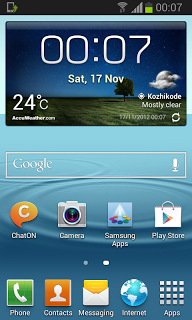
Recently Samsung announced that they will release Jelly Bean 4.1.2 to the Samsung Galaxy Ace 2 , the big brother of galaxy ace.It is very happy news to the Ace 2 users as they are getting Jelly bean update directly from Ginger Bread. Before arriving the official release by Samsung our SamMobile leaked Jelly bean 4.1.2 XXMB2 to Ace 2 users. You can manually flash it using Odin.
FIRMWARE INFO
Android : Jelly Bean 4.1.2Date February 19
PDA – I8160XXMB2
CSC – I8160OXAMB4
Note:
1. Flashing may brick your phone Do at your risk.
2. Your phone must be Galaxy Ace 2 GT I8160 internation version.
3. Backup All the Data in your Phone
4. Your Phone Charge Must Be 80% or above
5. Enable USB Debugging
6. Make sure you have installed Kies or Ace 2 driver
7. Exit Antivirus, Kies etc .. before start flashing.
How To Flash Jelly Bean 4.1.2 XXMB2 on Galaxy Ace 2 ?
1. Download Jelly Bean 4.1.2 XXMB2 and extract it.2. Download Odin3 v1.85 and extract it.
3. Boot your phone to Download Mode ( Volume down + Home + Power ) and connect to PC.
4. Now Open Odin 1.85 in PC and look in to ID:COM box it will be yellow with a port number in it.
5. In Odin Click PDA and select CODE file.
6. And Click CSC and select CSC file.
7. Click Start and wait the phone to reboot.
Thats it.
source
Available link for download
Subscribe to:
Posts (Atom)