Showing posts with label 2. Show all posts
Showing posts with label 2. Show all posts
Friday, April 28, 2017
Kontes Berhadiah Ultah RWP Uang Tunai total Rp 2 8 Juta
Kontes Berhadiah Ultah RWP Uang Tunai total Rp 2 8 Juta
Salam Sobat...
Dalam rangka Peringatan Ulang Tahun ke-6 RWP, RWP mengadakan Kontes berhadiah, Masa Berlaku Kontes Gratis ini 1 Bulan dari Sekarang…!
Program terbaru lainnya dalam rangka HUT RWP yg ke-6 adalah KONTES GRATIS berhadiah Uang Tunai total Rp. 2,8 Juta untuk 6 orang Pemenang. Sebelumnya RWP sudah melaunching Program Komisi PPS & Komisi PPL untuk Member RWP yg terdaftar.
Lihat Promo Program Komisi PPL RWP di sini >> Klik
KONTES GRATIS kali ini terbuka untuk semua Pembaca Setia Blog RWP Grup, baik yg sudah terdaftar sebagai Member RWP Premium, Member RWP Free, maupun utk yg belum terdaftar sama sekali. Asalkan Sobat mau mengisi biodata Kontes yg meliputi Nama, Email, dan Nomor Hp, lalu klik Link Konfirmasi di emailnya masing-masing, maka Sobat sudah bisa bergerak untuk mengikuti KONTES ini…!

Dapatkan hadiah Uang Tunai dg mengikuti KONTES GRATIS dari BLOG RWP Grup. Sobat tinggal DAFTAR GRATIS dan ikuti PANDUAN KERJA yg sudah disiapkan…!
Bagaimana Cara Mendaftar Kontes Gratis Blog RWP ini?
Berikut Beberapa Step untuk Mendaftar & Mengikuti Kontes Gratis Berhadiah Uang Tunai dari Blog RWP :
1. Klik Link Kontes berikut sehingga terbuka halaman baru : KONTES RWP
2. Isi Biodata Nama+Email+Nomor Hp Sobat sesuai data yg Valid (STEP KE-1, nilainya 3 POINTS)
>Setelah Selesai, lalu tekan Tombol dibawahnya bertuliskan “DAFTAR KONTES SEKARANG & MENANGKAN HADIAHNYA”>>
>Setelah itu akan keluar halaman INVITE FRIEND ke 3 orang teman (STEP KE-2, nilai Total 55 POINTS)
>Silahkan Undang 3 Orang Teman dg cara mengisi pada Format Email yg sudah disediakan…!
>Jika nanti undangan berhasil & Sobat sudah Verifikasi data pada nomor 3 di bawah, maka akan keluar Form Undangan Email lebih banyak lagi…!
3. Setelah itu, segera cek Email KONFIRMASI di bagian Inbox atau Spam. Email permintaan KONFIRMASI tsb berjudul : “Konfirmasi Pendaftaran Kontes..!”
4. Jika sudah ketemu Email KONFIRMASI dari kami, maka segera KLIK LINK KONFIRMASI yg diminta.
>KONFIRMASI ini merupakan SYARAT agar data pendaftaran Sobat diterima.
5. Setelah Sobat menekan Link Konfirmasi di email, maka akan ada pekerjaan STEP KE-3 (nilai Total 10 POINTS), yaitu SHARE informasi kontes ini ke MEDIA SOSIAL (Facebook, Twitter, dan Google Plus).
>Kami sudah menyediakan Format Status Share otomatis, Sobat bisa edit seperlunya nanti…!
6. Juga akan keluar LINK REFERRAL Sobat di bagian bawah Form SHARE Media Sosial tsb.
>Link Referral tsb bentuknya seperti ini sbg contoh : http://contest.io/c/7am7esf0
>Segera promosikan LINK REFERRAL SOBAT ke mana saja, karena setiap ada Referral baru yg mendaftar lewat Link tsb, maka Sobat dapat POINTS 10. Jika ada 10 orang saja yg mendaftar lewat Link Referral Sobat, maka nilainya adalah 100 POINTS.
Berikut Penjelasan NILAI POINTS untuk masing-masing PEKERJAAN yg Sobat lakukan :
1. Sobat isi biodata pertama kali, nilainya 3 Points.
2. Sobat kirim Invite Email ke 1 orang, nilainya 5 Points (invite 3 email teman akan dapat 15 Points = 5×3). Jika berhasil mengirim ke 3 email teman dg Format INVITE FRIEND, maka ada bonus lagi 10 Points.
3. Sharing ke Sosial Media dg Format yg sudah disediakan, nilai totalnya 10 Points.
4. Untuk setiap 1 orang Referral yg mendaftar lewat Link Referral Sobat, maka nilainya 10 Points. Jika ada 10 orang saja yg mendaftar lewat Link Referral Sobat, maka nilainya adalah 100 POINTS.
Berapa Hadiah Uang Tunai untuk Pemenang Kontes Gratis ini?
Ikuti “Kontes Gratis Blog RWP” berhadiah Total Rp. 2,8 Juta untuk 6 orang Pemenang…!
Silahkan Sobat ikuti KONTES GRATIS ini dan dapatkan hadiah UANG TUNAI total Rp. 2,8 Juta utk 6 orang PEMENANG yg mendapatkan point terbanyak.
————————————————————-
Pemenang ke-1 = Hadiah Uang Tunai Rp. 1 Juta.
Pemenang ke-2 = Hadiah Uang Tunai Rp. 700 Ribu.
Pemenang ke-3 = Hadiah Uang Tunai Rp. 500 Ribu.
Pemenang ke-4 = Hadiah Uang Tunai Rp. 300 Ribu.
Pemenang ke-5 = Hadiah Uang Tunai Rp. 200 Ribu.
Pemenang ke-6 = Hadiah Uang Tunai Rp. 100 Ribu.
————————————————————
>Segera isi Nama+Email+Nomor HP Sobat utk mendapatkan Link Referral agar bisa promosi gratis ke teman-temannya. Alat Promosi sudah kami sediakan berupa Email & Sharing ke Media Sosial.
————————————
Link Kontes Gratis Blog RWP >> KLik
————————————
Bagaimana Cara Sobat untuk Login Melihat JUMLAH POINTS saat ini yg TERKUMPUL??
Silahkan Isi Biodata kembali Pada Form Pendaftaran Awal di atas. Nanti otomatis keluar HALAMAN INFORMASI yg berisi JUMLAH POINT yg sudah TERKUMPUL karena sudah mengerjakan TUGAS sbg REFERRAL. Lanjutkan Promosikan Link REFERRAL Sobat agar semakin banyak yg mendaftar lewat Link tsb. Jika ada 10 orang saja yg mendaftar lewat Link Referral Sobat, maka nilainya adalah 100 POINTS (10 points x 10 Referral).
Sukses untuk Sobat yg mau dapat Hadiah Uang Tunai dg mengikuti Kontes Gratis dari Blog RWP Grup…!

Ingin Belajar Bisnis Online.....
Artikel Terkait
 :))
 ;))
 ;;)
 :D
 ;)
 :p
 :((
 :)
 :(
 :X
 =((
 :-o
 :-/
 :-*
 :|
 8-}
 :)]
 ~x(
 :-t
 b-(
 :-L
 x(
 =))
Dalam rangka Peringatan Ulang Tahun ke-6 RWP, RWP mengadakan Kontes berhadiah, Masa Berlaku Kontes Gratis ini 1 Bulan dari Sekarang…!
Program terbaru lainnya dalam rangka HUT RWP yg ke-6 adalah KONTES GRATIS berhadiah Uang Tunai total Rp. 2,8 Juta untuk 6 orang Pemenang. Sebelumnya RWP sudah melaunching Program Komisi PPS & Komisi PPL untuk Member RWP yg terdaftar.
Lihat Promo Program Komisi PPL RWP di sini >> Klik
KONTES GRATIS kali ini terbuka untuk semua Pembaca Setia Blog RWP Grup, baik yg sudah terdaftar sebagai Member RWP Premium, Member RWP Free, maupun utk yg belum terdaftar sama sekali. Asalkan Sobat mau mengisi biodata Kontes yg meliputi Nama, Email, dan Nomor Hp, lalu klik Link Konfirmasi di emailnya masing-masing, maka Sobat sudah bisa bergerak untuk mengikuti KONTES ini…!
Dapatkan hadiah Uang Tunai dg mengikuti KONTES GRATIS dari BLOG RWP Grup. Sobat tinggal DAFTAR GRATIS dan ikuti PANDUAN KERJA yg sudah disiapkan…!
Bagaimana Cara Mendaftar Kontes Gratis Blog RWP ini?
Berikut Beberapa Step untuk Mendaftar & Mengikuti Kontes Gratis Berhadiah Uang Tunai dari Blog RWP :
1. Klik Link Kontes berikut sehingga terbuka halaman baru : KONTES RWP
————————————
SEGERA DAFTAR disini
————————————
2. Isi Biodata Nama+Email+Nomor Hp Sobat sesuai data yg Valid (STEP KE-1, nilainya 3 POINTS)
>Setelah Selesai, lalu tekan Tombol dibawahnya bertuliskan “DAFTAR KONTES SEKARANG & MENANGKAN HADIAHNYA”>>
>Setelah itu akan keluar halaman INVITE FRIEND ke 3 orang teman (STEP KE-2, nilai Total 55 POINTS)
>Silahkan Undang 3 Orang Teman dg cara mengisi pada Format Email yg sudah disediakan…!
>Jika nanti undangan berhasil & Sobat sudah Verifikasi data pada nomor 3 di bawah, maka akan keluar Form Undangan Email lebih banyak lagi…!
3. Setelah itu, segera cek Email KONFIRMASI di bagian Inbox atau Spam. Email permintaan KONFIRMASI tsb berjudul : “Konfirmasi Pendaftaran Kontes..!”
4. Jika sudah ketemu Email KONFIRMASI dari kami, maka segera KLIK LINK KONFIRMASI yg diminta.
>KONFIRMASI ini merupakan SYARAT agar data pendaftaran Sobat diterima.
5. Setelah Sobat menekan Link Konfirmasi di email, maka akan ada pekerjaan STEP KE-3 (nilai Total 10 POINTS), yaitu SHARE informasi kontes ini ke MEDIA SOSIAL (Facebook, Twitter, dan Google Plus).
>Kami sudah menyediakan Format Status Share otomatis, Sobat bisa edit seperlunya nanti…!
6. Juga akan keluar LINK REFERRAL Sobat di bagian bawah Form SHARE Media Sosial tsb.
>Link Referral tsb bentuknya seperti ini sbg contoh : http://contest.io/c/7am7esf0
>Segera promosikan LINK REFERRAL SOBAT ke mana saja, karena setiap ada Referral baru yg mendaftar lewat Link tsb, maka Sobat dapat POINTS 10. Jika ada 10 orang saja yg mendaftar lewat Link Referral Sobat, maka nilainya adalah 100 POINTS.
Berikut Penjelasan NILAI POINTS untuk masing-masing PEKERJAAN yg Sobat lakukan :
1. Sobat isi biodata pertama kali, nilainya 3 Points.
2. Sobat kirim Invite Email ke 1 orang, nilainya 5 Points (invite 3 email teman akan dapat 15 Points = 5×3). Jika berhasil mengirim ke 3 email teman dg Format INVITE FRIEND, maka ada bonus lagi 10 Points.
3. Sharing ke Sosial Media dg Format yg sudah disediakan, nilai totalnya 10 Points.
4. Untuk setiap 1 orang Referral yg mendaftar lewat Link Referral Sobat, maka nilainya 10 Points. Jika ada 10 orang saja yg mendaftar lewat Link Referral Sobat, maka nilainya adalah 100 POINTS.
Berapa Hadiah Uang Tunai untuk Pemenang Kontes Gratis ini?
Ikuti “Kontes Gratis Blog RWP” berhadiah Total Rp. 2,8 Juta untuk 6 orang Pemenang…!
Silahkan Sobat ikuti KONTES GRATIS ini dan dapatkan hadiah UANG TUNAI total Rp. 2,8 Juta utk 6 orang PEMENANG yg mendapatkan point terbanyak.
————————————————————-
Pemenang ke-1 = Hadiah Uang Tunai Rp. 1 Juta.
Pemenang ke-2 = Hadiah Uang Tunai Rp. 700 Ribu.
Pemenang ke-3 = Hadiah Uang Tunai Rp. 500 Ribu.
Pemenang ke-4 = Hadiah Uang Tunai Rp. 300 Ribu.
Pemenang ke-5 = Hadiah Uang Tunai Rp. 200 Ribu.
Pemenang ke-6 = Hadiah Uang Tunai Rp. 100 Ribu.
————————————————————
>Segera isi Nama+Email+Nomor HP Sobat utk mendapatkan Link Referral agar bisa promosi gratis ke teman-temannya. Alat Promosi sudah kami sediakan berupa Email & Sharing ke Media Sosial.
————————————
Link Kontes Gratis Blog RWP >> KLik
————————————
Bagaimana Cara Sobat untuk Login Melihat JUMLAH POINTS saat ini yg TERKUMPUL??
Silahkan Isi Biodata kembali Pada Form Pendaftaran Awal di atas. Nanti otomatis keluar HALAMAN INFORMASI yg berisi JUMLAH POINT yg sudah TERKUMPUL karena sudah mengerjakan TUGAS sbg REFERRAL. Lanjutkan Promosikan Link REFERRAL Sobat agar semakin banyak yg mendaftar lewat Link tsb. Jika ada 10 orang saja yg mendaftar lewat Link Referral Sobat, maka nilainya adalah 100 POINTS (10 points x 10 Referral).
Sukses untuk Sobat yg mau dapat Hadiah Uang Tunai dg mengikuti Kontes Gratis dari Blog RWP Grup…!
Ingin Belajar Bisnis Online.....
Artikel Terkait
:)) ;)) ;;) :D ;) :p :(( :) :( :X =(( :-o :-/ :-* :| 8-} :)] ~x( :-t b-( :-L x( =))Available link for download

Thursday, April 27, 2017
Martech Box III update V 0 1 2 2902 News
Martech Box III update V 0 1 2 2902 News
Martech Box III - update V 0.1.2.2902

Unofficial Support Site By Welcome Zone Haldwani
Latest Update:Gamma CC (wide panel) Blaupunkt Audi 7 644 858 380
KDC-M6021G, KE-0871 Kenwood
RCD 215 Technisat VW 1S0 0351 156A
Symphony II+ Blaupunkt Audi 8E0 035 195AC
ULAU210 Technisat Audi 8X0 035 160B
Bes Regards
Tech Mobil
Martech Team
Available link for download
Tuesday, April 11, 2017
iPhone 6s Clone MT6571 NAND Apple 6s Apple 4 2 2 ALPS JB7 MP V1 14 100 tested by me
iPhone 6s Clone MT6571 NAND Apple 6s Apple 4 2 2 ALPS JB7 MP V1 14 100 tested by me
MT6571_NAND_Apple__6s__Apple__4.2.2__ALPS.JB7.MP.V1.14
iPhone 6s Clone
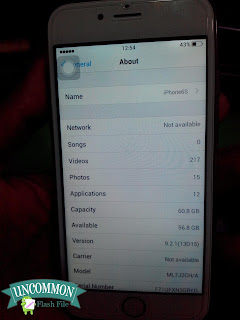
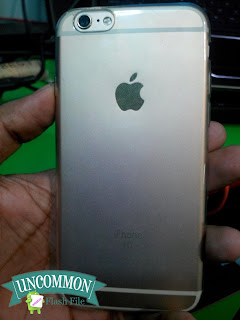
Reading Flash Content now ...
[Read Ok] : preloader_zr71_e_lca.bin
[Read Ok] : lk.bin
[Read Ok] : boot.img
[Read Ok] : recovery.img
[Read Ok] : secro.img
[Read Ok] : logo.bin
[Read Ok] : system.img
[Read Ok] : cache.img
[Read Ok] : usrdata.img
[ScatCFG] : MT6571 / V1.1.1 / zr71_e_lca / NAND
FW Size : 320 MiB
Brand : Apple
ProdName : Apple iPhone
ProdModel : 6s
Device : Apple
AndroidVer: 4.2.2
MTKxCPU : MT6589
MTKxPRJ : ALPS.JB7.MP.V1.14
Android Info saved
 Ph: +8801712804630
Yahoo id : uzzal_computer@yahoo.com
Skype : uzzal.computer
Facebook id : uzzal.computer
How to Flash
Step 1: Download and extract the firmware on your computer.
Step 2: After extracting you will find the SP Flash Tool, Driver and instruction manual.
Step 3: Install the USB Drivers (skip if drivers are already installed).
Step 4: Open the SP Flash Tool and load the Scatter File from the firmware folder.Step
5: Connect your Smartphone to the computer using the USB Driver.Step 6: Click on Upgrade / Download Button in the SP Flash Tool to Begin the Flashing.Step 7: Green Ring will appear at the end of successful Flash.
iPhone 6s Clone
Reading Flash Content now ...
[Read Ok] : preloader_zr71_e_lca.bin
[Read Ok] : lk.bin
[Read Ok] : boot.img
[Read Ok] : recovery.img
[Read Ok] : secro.img
[Read Ok] : logo.bin
[Read Ok] : system.img
[Read Ok] : cache.img
[Read Ok] : usrdata.img
[ScatCFG] : MT6571 / V1.1.1 / zr71_e_lca / NAND
FW Size : 320 MiB
Brand : Apple
ProdName : Apple iPhone
ProdModel : 6s
Device : Apple
AndroidVer: 4.2.2
MTKxCPU : MT6589
MTKxPRJ : ALPS.JB7.MP.V1.14
Android Info saved
Yahoo id : uzzal_computer@yahoo.com
Skype : uzzal.computer
Facebook id : uzzal.computer
How to Flash
Step 1: Download and extract the firmware on your computer.
Step 2: After extracting you will find the SP Flash Tool, Driver and instruction manual.
Step 3: Install the USB Drivers (skip if drivers are already installed).
Step 4: Open the SP Flash Tool and load the Scatter File from the firmware folder.Step
5: Connect your Smartphone to the computer using the USB Driver.Step 6: Click on Upgrade / Download Button in the SP Flash Tool to Begin the Flashing.Step 7: Green Ring will appear at the end of successful Flash.
Available link for download
Monday, April 10, 2017
Intex Legend Usb 2 Dvb S Tv Tuner Driver
Intex Legend Usb 2 Dvb S Tv Tuner Driver
Best intex legend usb.2 dvb s tv tuner driver.
Driver Info:
File name: intex_legend_usb2_dvb_s_tv_tuner.zip
Driver version: 2.0.9
File size: 2 290 KB
File origin: search engine
100% guarantee of safety.
Available link for download
Friday, April 7, 2017
Lenovo A7 30 A3300gv and Lenovo A7 30 A3300hv 4 4 2 Stock Firmware
Lenovo A7 30 A3300gv and Lenovo A7 30 A3300hv 4 4 2 Stock Firmware
Lenovo A7-30 A3300gv
Mediatek MT 6582
Lenovo A7-30 A3300hv
Mediatek MT8121M
4.4.2 Stock Firmware
lenovo A3300 rom and Update.
Update Lenovo A7-30 best tablets to Android Kitkat 4.4.2. Tested firmware and Tutorials.

Lenovo manufacture two best tablets under the same name of A3300 , called A3300Gv and A3300Hv .A7-30 ,A3300gv is Meditek MT6582 chipset base tablet and A7-30, A3300hv is Mediatek MT 8121M Chipset based tablet. You must know the difference between A3300gv and A3300hv . Both tablets are look like same but have huge difference in spec and firmware files. Both tablets support different type of mediatek chipset.
Few days back got chance to play with this beauty called Lenovo tablet A7-30 ,A3300gv . The actual problem was "adb sideload " error on startup. I tried all the solution beside flashing stock rom but none of them work. Reset tablet will work in most cases but did not work in mine. You must try reset / hard reset first if your tablet is facing "adb sideload " error , software errors , or stuck on boot logo or forgotten user password. To reset your lenovo tablet there is small hole next to micro card slot. found this image on lenovo forums.

Hard Reset Lenovo Tablet
To hard reset your lenovo tablet turn off tablet , Press volume down button and press power . You will see recovery menu . Select Wipe data . (This will erase all user data from internal storage e.g Contacts , Photos, Videos, Apps) but not the stock apps .In my case none of above mentioned method work so I decided to flash lenovos firmware . Spending some time I found stock rom 4.4.2 kitkat for lenovo tablet.
Lenovo A7-30 A3300GV Firmware.
Download Stock Firmware for A3300GV
Firmware Version : 4.4.2 Kitkat
File Size :zip 641 mb after unzip 1.05 gb(including drivers,flashing tools)
Build No. A442_01_46_150104_ROW

Lenovo A7-30 A3300HV Firmware.
Download Stock Firmware for A3300HV
Firmware version : 4.4.2 Kitkat
File Size : zip 851 mb after unzip 1.27 gb(including drivers,flashing tools)
Build No. A3300HV A442_01_19_140827_ROW
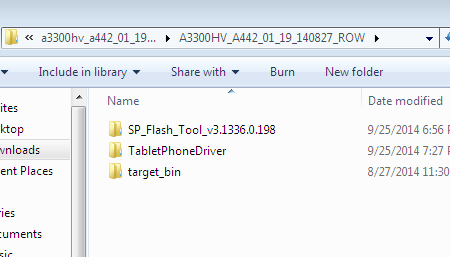
How to flash Lenovo A7-30 Tablet.
Unzip firmware .
Install Driver Auto installer.
Open SP Flash Tool

Open scatter-loading file and select scatter.txt file from firmware folder.

You will see bunch of files loaded in SP Flash tool.Now its time to start flashing firmware on lenovo a3300 tablet. Click on Download .

A Purple line will be start and gather all information regarding firmware .Turn off A3300 press volume down button , insert cable and press power button. Lenovo tablet will be detect by software and burning firmware process will be start.

A Yellow bar will be complete to 100% and you will see green circle with "Download OK" . Congrats you have successfully flash lenovo a7-30 a3300gv tablet.

Conclusion.


These screenshots were taken during flashing of A3300GV but flashing procedure for A3300HV is same as mention. No problem were found during flash(A3300GV). In some cases (not mine) after flashing, tablet hang on logo then you need to Hard reset your tab and wait until it turns on . Before flashing tablet you must identify your tablet version (GV or HV) in case of wrong attempt you may result dead tablet.
Above mentioned firmware and tutorial is best of my knowledge but I do not take any responsibility of any loss.
You may also like to read :
Lenovo Ideatab A2107A-h Hard Reset, Firmware , CWM and Root.
Above mentioned firmware and tutorial is best of my knowledge but I do not take any responsibility of any loss.
You may also like to read :
Lenovo Ideatab A2107A-h Hard Reset, Firmware , CWM and Root.
Available link for download
Thursday, April 6, 2017
LENOVO K3 NOTE TWRP Updated to V3 0 2 3
LENOVO K3 NOTE TWRP Updated to V3 0 2 3
Screenshots:



Changelog:
1. Fixed bugs.
1. Fixed bugs.
Install Instructions:
METHOD-1: Download the given below zip file and flash it by going into twrp recovery to get new recovery.
METHOD-2: Download the given below K3 Note TWRP Recovery v3.0.2-3.img file and install it using flashify or any other flashable app. This need root access before itself.
METHOD-3: Download the given below folder which contains Scatter file and recovery.img.
- This methods requires SP Flash Tool, open it and select MT6752 Scatter file from downloaded folder, then you can see only recovery option will be checked in Flash tool.
- Click on download in flash tool and connect your phone as switch off and while connecting usb press volume down and connect to detect the phone and flash.
- It requires VCOM drivers installed.
recovery.img
MT6752 Scatter File
Available link for download
Subscribe to:
Posts (Atom)