Showing posts with label stock. Show all posts
Showing posts with label stock. Show all posts
Wednesday, April 26, 2017
Karbonn A91 Stock Rom Flash File Download
Karbonn A91 Stock Rom Flash File Download

Karbonn A91 Firmware Download
Karbonn A91 Flash File Rom official DownloadKarbonn A91 Firmware Download
ALL TOOLS AND ORIGINAL FLASH FILES LINK GIVEN BELOWQues- when will you need to install the operating system software in your phone ?
Ans- Flashing required when Karbonn A91 operating system gets corrupted , dead or it shows some problems like :-
- Phone functioning very slow.
- Restart automatically.
- Display not working well.
- When opening camera suddenly an error occurred and camera stopped working.
- some application is stopped working.
- booting problem occurs
- Virus problem
- network problem.
How To Flash Click Here See instructions
How To Repair IMEI Click Here See instructions
Karbonn A91 Flash File Here
| Karbonn A91 | Karbonn A91 Firmware Download | Download |
| Karbonn A91 | usb drivers | Download |
| connect with us on facebook | Like This | |
| our android app | for more direct update | Download |
FOLLOW US ON FACEBOOK
TRY OUR ANDROID APP
Available link for download

Sunday, April 16, 2017
Lenovo A369i Firmware Flash File Stock ROMs Free Download
Lenovo A369i Firmware Flash File Stock ROMs Free Download
Latest official firmware of Lenovo A369i android firmware and Lenovo A369i android v4.2.2 Jelly Bean can be free download here. You will be able to download most recent version file from the given downloading link at the bottom of this page. You are to just click on the given downloading link below. It will redirect you for the full setup firmware of Lenovo A369i. Lenovo A369i contains the android firmware and Lenovo A369i contains the android Jelly Bean firmware. These two latest firmware has been given here to free download.

The downloading link below has been brought you from the most authentic free source. I have uploaded it on Google Drive and then its downloading link has added below. You may use a proper link to download the accurate file. There are two links has been given named Lenovo A369i. If you have aLenovo A369i mobile then click on A369i link and get start its downloading, and if you have Lenovo A369i the click on the A369i link to start downloading.
Available link for download
Saturday, April 15, 2017
Intex Aqua R2 Stock Rom Flash File Download
Intex Aqua R2 Stock Rom Flash File Download

Intex Aqua R2 Firmware Download
Intex Aqua R2 Flash File Rom official DownloadIntex Aqua R2 Firmware Download
ALL TOOLS AND ORIGINAL FLASH FILES LINK GIVEN BELOWQues- when will you need to install the operating system software in your phone ?
Ans- Flashing required when Intex Aqua R2 operating system gets corrupted , dead or it shows some problems like :-
- Phone functioning very slow.
- Restart automatically.
- Display not working well.
- When opening camera suddenly an error occurred and camera stopped working.
- some application is stopped working.
- booting problem occurs
- Virus problem
- network problem.
How To Flash Click Here See instructions
How To Repair IMEI Click Here See instructions
Intex Aqua R2 Flash File Here
| Intex Aqua R2 | Intex Aqua R2 Firmware Download | Download |
| Intex Aqua R2 | usb drivers | Download |
| connect with us on facebook | Like This | |
| our android app | for more direct update | Download |
FOLLOW US ON FACEBOOK
TRY OUR ANDROID APP
Available link for download
Thursday, April 13, 2017
Karbonn A26 New Stock Rom Flash File Download
Karbonn A26 New Stock Rom Flash File Download
Karbonn A26 New Firmware Download
Karbonn A26 New Flash File Rom official DownloadKarbonn A26 New Firmware Download
ALL TOOLS AND ORIGINAL FLASH FILES LINK GIVEN BELOWQues- when will you need to install the operating system software in your phone ?
Ans- Flashing required when Karbonn A26 New operating system gets corrupted , dead or it shows some problems like :-
- Phone functioning very slow.
- Restart automatically.
- Display not working well.
- When opening camera suddenly an error occurred and camera stopped working.
- some application is stopped working.
- booting problem occurs
- Virus problem
- network problem.
How To Flash Click Here See instructions
How To Repair IMEI Click Here See instructions
Karbonn A26 New Flash File Here
| Karbonn A26 New | Karbonn A26 New Firmware Download | Download |
| Karbonn A26 New | usb drivers | Download |
| connect with us on facebook | Like This | |
| our android app | for more direct update | Download |
FOLLOW US ON FACEBOOK
TRY OUR ANDROID APP
Available link for download
Friday, April 7, 2017
Lenovo A7 30 A3300gv and Lenovo A7 30 A3300hv 4 4 2 Stock Firmware
Lenovo A7 30 A3300gv and Lenovo A7 30 A3300hv 4 4 2 Stock Firmware
Lenovo A7-30 A3300gv
Mediatek MT 6582
Lenovo A7-30 A3300hv
Mediatek MT8121M
4.4.2 Stock Firmware
lenovo A3300 rom and Update.
Update Lenovo A7-30 best tablets to Android Kitkat 4.4.2. Tested firmware and Tutorials.

Lenovo manufacture two best tablets under the same name of A3300 , called A3300Gv and A3300Hv .A7-30 ,A3300gv is Meditek MT6582 chipset base tablet and A7-30, A3300hv is Mediatek MT 8121M Chipset based tablet. You must know the difference between A3300gv and A3300hv . Both tablets are look like same but have huge difference in spec and firmware files. Both tablets support different type of mediatek chipset.
Few days back got chance to play with this beauty called Lenovo tablet A7-30 ,A3300gv . The actual problem was "adb sideload " error on startup. I tried all the solution beside flashing stock rom but none of them work. Reset tablet will work in most cases but did not work in mine. You must try reset / hard reset first if your tablet is facing "adb sideload " error , software errors , or stuck on boot logo or forgotten user password. To reset your lenovo tablet there is small hole next to micro card slot. found this image on lenovo forums.

Hard Reset Lenovo Tablet
To hard reset your lenovo tablet turn off tablet , Press volume down button and press power . You will see recovery menu . Select Wipe data . (This will erase all user data from internal storage e.g Contacts , Photos, Videos, Apps) but not the stock apps .In my case none of above mentioned method work so I decided to flash lenovos firmware . Spending some time I found stock rom 4.4.2 kitkat for lenovo tablet.
Lenovo A7-30 A3300GV Firmware.
Download Stock Firmware for A3300GV
Firmware Version : 4.4.2 Kitkat
File Size :zip 641 mb after unzip 1.05 gb(including drivers,flashing tools)
Build No. A442_01_46_150104_ROW

Lenovo A7-30 A3300HV Firmware.
Download Stock Firmware for A3300HV
Firmware version : 4.4.2 Kitkat
File Size : zip 851 mb after unzip 1.27 gb(including drivers,flashing tools)
Build No. A3300HV A442_01_19_140827_ROW
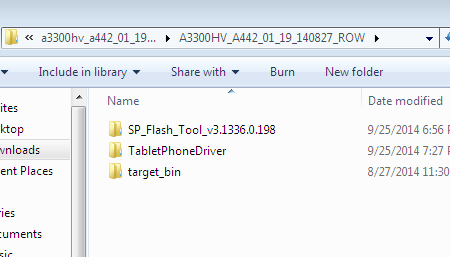
How to flash Lenovo A7-30 Tablet.
Unzip firmware .
Install Driver Auto installer.
Open SP Flash Tool

Open scatter-loading file and select scatter.txt file from firmware folder.

You will see bunch of files loaded in SP Flash tool.Now its time to start flashing firmware on lenovo a3300 tablet. Click on Download .

A Purple line will be start and gather all information regarding firmware .Turn off A3300 press volume down button , insert cable and press power button. Lenovo tablet will be detect by software and burning firmware process will be start.

A Yellow bar will be complete to 100% and you will see green circle with "Download OK" . Congrats you have successfully flash lenovo a7-30 a3300gv tablet.

Conclusion.


These screenshots were taken during flashing of A3300GV but flashing procedure for A3300HV is same as mention. No problem were found during flash(A3300GV). In some cases (not mine) after flashing, tablet hang on logo then you need to Hard reset your tab and wait until it turns on . Before flashing tablet you must identify your tablet version (GV or HV) in case of wrong attempt you may result dead tablet.
Above mentioned firmware and tutorial is best of my knowledge but I do not take any responsibility of any loss.
You may also like to read :
Lenovo Ideatab A2107A-h Hard Reset, Firmware , CWM and Root.
Available link for download
Maximus MAX908 Firmware Flash File Stock ROMs Free Download
Maximus MAX908 Firmware Flash File Stock ROMs Free Download
Here you will download latest stock roms of Maximus MAX908. The latest Maximus Flash file, stock rom file without password size is 274 MB. The downloading link has been brought you from indishare. You can download it from the given downloading link below here. The given stock rom file is only compatible with Maximus MAX908 mobile phone. You can only flash your Maximus MAX908 brand by using. SP FLASH TOOL

Click on the given downloading link at the bottom of this page.
Follow the instructions which will be shown in front of you after clicking on the link below
Use a compatible flashing tool while flashing process
After sucessfull flashing your brand, just reboot it and keep enjoying.
Start downloading of Maximus MAX908 latest firmware/ stock rom from here. It is the most recent stock rom file which has been brough you from an open source. It is an official file that has been downloaded from Maximus official site and then uploaded on indishare, and indishare downloading link has been shared for you. Download
Maximus MAX908 Firmware Download Here
File password is: http://www.latest-setup.org
MTK Flash Tool Using SP Flash Tool Download Here
Mediatek (MTK) USB Driver Download Here
- Unpack FlashTools, and Click on Flash_tool.exe
- Select "scatter-Loading" and search MT6572_Android_scatter.txt in ROM
- Wait file to be added into Flash Tool
- Select "Download Only" or if upgrade "Firmware upgrade"
- Turn off your phone, remove the battery (if the battery is removable) and replace it after some seconds (and dont turn on the phone).
- Press “Download” button to start
- and connect your phone into the computer via USB data cable.
- The process will start and a red progress bar will appear after color purple, yellow.
- And green circles display
- Finish !
- You can now safely disconnect your phone and turn it on.
Available link for download
Thursday, April 6, 2017
Kumpulan Stock Rom Samsung Galaxy Super Copy
Kumpulan Stock Rom Samsung Galaxy Super Copy
==========>All Tipe Stock Rom Samsung Galay SC<============
=====================================================
Stock ROM GT-I9500 Galaxy S4 MT6572_JDQ39_I9500XXUAMDE Full Backup
I9500 Galaxy S4_MT6572 Part1
I9500 Galaxy S4_MT6572 Part2
I9500 Galaxy S4_MT6572 Part3
Info ROM SS Klik
Stock ROM GT-I9500 Galaxy S4 MT6572_JDQ39.I9500XXUAMDE_1-sh1282_bft_boe_fwvga_JB4.2.2_20140107 Full Backup
GT-I9500 Galaxy S4_MT6572 Download
Info ROM SS Klik
Stock ROM GT-I9500 Galaxy S4 MT6572_JDQ39.I9500XXUAMDE_1-hx8369b_dsi_vdo_2014.04.07 Read BIN
I9500 Galaxy S4_MT6572 Part1
I9500 Galaxy S4_MT6572 Part2
I9500 Galaxy S4_MT6572 Part3
Info ROM SS Klik
Stock ROM SM-G900 (GT-I9008) Galaxy S5 MT6572_ALPS_JB3_MP1_V1_KK4.4.2_lcd_1-ili9806e_20140417
GT-I9008 Galaxy S5_MT6572 Part1
GT-I9008 Galaxy S5_MT6572 Part2
Info ROM SS Klik
Stock ROM SM-G900F Galaxy S5 MT6572_2014.04.16 Full Backup
SM-G900F Galaxy S5_MT6572 Part1
SM-G900F Galaxy S5_MT6572 Part2
SM-G900F Galaxy S5_MT6572 Part3
Info ROM SS Klik
Stock ROM SM-N900 Galaxy Note3 MT6572_5,7in_2014.05.28 Full Backup
SM-N900_Galaxy Note3_MT6572 Part1
SM-N900_Galaxy Note3_MT6572 Part2
SM-N900_Galaxy Note3_MT6572 Part3
Info ROM SS Klik
Stock ROM SM-N9100 Galaxy Note 4 MT6572_1sim_KK4.4_LCD1-otm9605_qlrd_dsi_vdo_20141230
SM-N9100 Galaxy Note 4_MT6572 Part1
SM-N9100 Galaxy Note 4_MT6572 Part2
SM-N9100 Galaxy Note 4_MT6572 Part3
Pasword : inbox fb. hcc.cell@gmail.com/ Mas Doyok
Available link for download
Wednesday, March 29, 2017
Lava QC800 Stock Rom Flash File Download
Lava QC800 Stock Rom Flash File Download

Lava QC800 Firmware Download
Lava QC800 Flash File Rom official DownloadLava QC800 Firmware Download
ALL TOOLS AND ORIGINAL FLASH FILES LINK GIVEN BELOWQues- when will you need to install the operating system software in your phone ?
Ans- Flashing required when Lava QC800 operating system gets corrupted , dead or it shows some problems like :-
- Phone functioning very slow.
- Restart automatically.
- Display not working well.
- When opening camera suddenly an error occurred and camera stopped working.
- some application is stopped working.
- booting problem occurs
- Virus problem
- network problem.
How To Flash Click Here See instructions
How To Repair IMEI Click Here See instructions
Lava QC800 Flash File Here
| Lava QC800 | Lava QC800 Firmware Download | Download |
| Lava QC800 | usb drivers | Download |
| connect with us on facebook | Like This | |
| our android app | for more direct update | Download |
FOLLOW US ON FACEBOOK
TRY OUR ANDROID APP
Available link for download
Monday, March 27, 2017
Lenovo A390 MT6577 Stock Firmware
Lenovo A390 MT6577 Stock Firmware
Lenovo A390 Stock Firmware and Flashing Tool
MT6577 Firmware / flashing tutorials
how to flash lenovo A390 to stock firmware

Lenovo A390 is 4" smartphone based on Mediatek MT6577 CPU. The following firmware will restore your lenovo a390 back to factory settings and will install Stock firmware . The following firmware based on android 4.0.4 stock firmware. SP Flash tool will be used to flash lenovo a390 smartphone to 4.0.4. If you are not familiar with Mediatek flashing tool then you must read tutorial before start flashing .
How to flash lenovo a390 smartphone .
Download Firmware and unzip .
Open SP Flash tool and select scatter.txt file
Click on download
Battery out, in and press volume up button and insert cable. Follow the tutorial for further detail .for reference see image.
Read : how to flash mediatek with SP Flash tool

Download Firmware for Lenovo A390
Firmware Detail :
Android OS : 4.0.4
Genres : Official
File Size : Upto 900mb (included 4 different stock firmware)
CPU : Mediatek MT6577
You may also like :
CWM Recovery for Mediatek
What is bootloader on Android
Lenovo A889 Stock firmware and tools
all logo and images are the property of their respective owners.
Available link for download
Friday, March 24, 2017
Intex Aqua P2 Stock Rom Flash File Download
Intex Aqua P2 Stock Rom Flash File Download
Intex Aqua P2 Firmware Download
Intex Aqua P2 Flash File Rom official DownloadIntex Aqua P2 Firmware Download
ALL TOOLS AND ORIGINAL FLASH FILES LINK GIVEN BELOWQues- when will you need to install the operating system software in your phone ?
Ans- Flashing required when Intex Aqua P2 operating system gets corrupted , dead or it shows some problems like :-
- Phone functioning very slow.
- Restart automatically.
- Display not working well.
- When opening camera suddenly an error occurred and camera stopped working.
- some application is stopped working.
- booting problem occurs
- Virus problem
- network problem.
How To Flash Click Here See instructions
How To Repair IMEI Click Here See instructions
Intex Aqua P2 Flash File Here
| Intex Aqua P2 | Intex Aqua P2 Firmware Download | Download |
| Intex Aqua P2 | usb drivers | Download |
| connect with us on facebook | Like This | |
| our android app | for more direct update | Download |
FOLLOW US ON FACEBOOK
TRY OUR ANDROID APP
Available link for download
Wednesday, March 22, 2017
Lenovo A319 Firmware Flash File Stock ROMs Free Download
Lenovo A319 Firmware Flash File Stock ROMs Free Download
Lenovo A319 Firmware, Flash Tool And USB Driver Free Download
Download latest version stock roms for Lenovo A319 free from here. There are various specification which have been available in the market like Lenovo A319 with 4 GB ROM, 512 MB RAM,Lenovo A319 with 512 MB RAM and 4 GB ROM. Commonly there are three various models of Lenovo A319. I have shared the latest stock roms for all the models of Lenovo A319. You can download stock rom for your Lenovo A319 smart phone by clicking on the given downloading link below. Remember that you have to choose an appropriate link to download stock rom file according to your Lenovo A319 spcification.

Free for everyone in the world
Officials files and most updated files are here
Stock roms with mtk backups
Some bugs have been fixed in this updated files
To start download of stock roms for Lenovo A319, scroll down of this article and point your cursor at the given downloading links below here. There you are to click on a link which is mostly compatible with your Lenovo smart phone model. After clicking on it you will be redirect ot indishare where you can get your required file in movement. So, get start here.
lenovo a319 flash file without password
Lenovo A319 Flash File Download Link
Lenovo A319 SP Flash Tool Download Link
Lenovo A319 (MTK) USB Driver Download Link
Available link for download
Friday, March 17, 2017
Karbonn A8 Stock Rom Flash File Download
Karbonn A8 Stock Rom Flash File Download
Karbonn A8 Firmware Download
Karbonn A8 Flash File Rom official DownloadKarbonn A8 Firmware Download
ALL TOOLS AND ORIGINAL FLASH FILES LINK GIVEN BELOWQues- when will you need to install the operating system software in your phone ?
Ans- Flashing required when Karbonn A8 operating system gets corrupted , dead or it shows some problems like :-
- Phone functioning very slow.
- Restart automatically.
- Display not working well.
- When opening camera suddenly an error occurred and camera stopped working.
- some application is stopped working.
- booting problem occurs
- Virus problem
- network problem.
How To Flash Click Here See instructions
How To Repair IMEI Click Here See instructions
Karbonn A8 Flash File Here
| Karbonn A8 | Karbonn A8 Firmware Download | Download |
| Karbonn A8 | usb drivers | Download |
| connect with us on facebook | Like This | |
| our android app | for more direct update | Download |
FOLLOW US ON FACEBOOK
TRY OUR ANDROID APP
Available link for download
Wednesday, March 15, 2017
Karbonn A100 Stock Rom Flash File Download
Karbonn A100 Stock Rom Flash File Download
Karbonn A100 Firmware Download
Karbonn A100 Flash File Rom official DownloadKarbonn A100 Firmware Download
ALL TOOLS AND ORIGINAL FLASH FILES LINK GIVEN BELOWQues- when will you need to install the operating system software in your phone ?
Ans- Flashing required when Karbonn A100 operating system gets corrupted , dead or it shows some problems like :-
- Phone functioning very slow.
- Restart automatically.
- Display not working well.
- When opening camera suddenly an error occurred and camera stopped working.
- some application is stopped working.
- booting problem occurs
- Virus problem
- network problem.
How To Flash Click Here See instructions
How To Repair IMEI Click Here See instructions
Karbonn A100 Flash File Here
| Karbonn A100 | Karbonn A100 Firmware Download | Download |
| Karbonn A100 | usb drivers | Download |
| connect with us on facebook | Like This | |
| our android app | for more direct update | Download |
FOLLOW US ON FACEBOOK
TRY OUR ANDROID APP
Available link for download
Sunday, March 12, 2017
Karbonn A11 K Stock Rom Flash File Download
Karbonn A11 K Stock Rom Flash File Download
Karbonn A11 K Firmware Download
Karbonn A11 K Flash File Rom official DownloadKarbonn A11 K Firmware Download
ALL TOOLS AND ORIGINAL FLASH FILES LINK GIVEN BELOWQues- when will you need to install the operating system software in your phone ?
Ans- Flashing required when Karbonn A11 K operating system gets corrupted , dead or it shows some problems like :-
- Phone functioning very slow.
- Restart automatically.
- Display not working well.
- When opening camera suddenly an error occurred and camera stopped working.
- some application is stopped working.
- booting problem occurs
- Virus problem
- network problem.
How To Flash Click Here See instructions
How To Repair IMEI Click Here See instructions
Karbonn A11 K Flash File Here
| Karbonn A11 K | Karbonn A11 K Firmware Download | Download |
| Karbonn A11 K | usb drivers | Download |
| connect with us on facebook | Like This | |
| our android app | for more direct update | Download |
FOLLOW US ON FACEBOOK
TRY OUR ANDROID APP
Available link for download
Saturday, March 11, 2017
Latest Stock Rom Original firmware for all Zopo Smartphone Spflashfiles com
Latest Stock Rom Original firmware for all Zopo Smartphone Spflashfiles com
Hi Every one here you will find the latest Stock Rom (Original firmware) for all Zopo Smartphone.
Zopo 6560 Stock Rom
Model: Zopo 6560Country: all
Version: Android 4.4.2
Rom Size: 478 MB
Download
Zopo 8510 Stock Rom
Model: Zopo 8510Country: all
Version: Android 4.4.2
Rom Size: 519 MB
Download
Zopo 9515 Stock Rom
Model: Zopo 9515Country: all
Version: Android 4.2.2
Rom Size: 496 MB
Download
Zopo 9520 Stock Rom
Model: Zopo 9520Country: all
Version: Android 4.2.2
Rom Size: 446 MB
Download
Zopo 9530 Stock Rom
Model: Zopo 9530Country: all
Version: Android 4.4.2
Rom Size: 508 MB
Download
Zopo C2 Stock Rom
Model: Zopo C2Country: all
Version: Android 4.1.1
Rom Size: 378 MB
Download
Zopo C3 Stock Rom
Model: Zopo C3Country: all
Version: Android 4.2.1
Rom Size: 336 MB
Download
Zopo Caesar A9600 Stock Rom
Model: Zopo Caesar A9600Country: all
Version: Android 4.0.4
Rom Size: 263 MB
Download
Zopo ZP100 Stock Rom
Model: Zopo ZP100Country: all
Version: Android 4.0.4
Rom Size: 332 MB
Download
Zopo ZP200 Stock Rom
Model: Zopo ZP200Country: all
Version: Android 4.0.3
Rom Size: 457 MB
Download
Zopo ZP200 Plus Stock Rom
Model: Zopo ZP200+Country: all
Version: Android 4.0.3
Rom Size: 344 MB
Download
Zopo ZP300 Stock Rom
Model: Zopo ZP300Country: all
Version: Android 4.0.3
Rom Size: 456 MB
Download
Zopo ZP300 Plus Stock Rom
Model: Zopo ZP300+Country: all
Version: Android 4.0.3
Rom Size: 321 MB
Download
Zopo ZP300S Stock Rom
Model: Zopo ZP300SCountry: all
Version: Android 4.0.3
Rom Size: 302 MB
Download
Zopo ZP300S Stock Rom
Model: Zopo ZP3020Country: all
Version: Android 4.4.2
Rom Size: 438 MB
Download
Zopo ZP500 Stock Rom
Model: Zopo ZP500Country: all
Version: Android 4.0.3
Rom Size: 311 MB
Download
Zopo ZP500 Plus Stock Rom
Model: Zopo ZP500+Country: all
Version: Android 4.0.4
Rom Size: 317 MB
Download
Zopo ZP500S Stock Rom
Model: Zopo ZP500SCountry: all
Version: Android 4.0.3
Rom Size: 221 MB
Download
Zopo ZP520 Stock Rom
Model: Zopo ZP520Country: all
Version: Android 4.4.2
Rom Size: 434 MB
Download
Zopo ZP590 Stock Rom
Model: Zopo ZP590Country: all
Version: Android 4.4.2
Rom Size: 492 MB
Download
Zopo ZP600 Stock Rom
Model: Zopo ZP600Country: all
Version: Android 4.0.4
Rom Size: 201 MB
Download
Zopo ZP700 Stock Rom
Model: Zopo ZP700Country: all
Version: Android 4.2.2
Rom Size: 437 MB
Download
Zopo ZP780 Stock Rom
Model: Zopo ZP780Country: all
Version: Android 4.2.2
Rom Size: 400 MB
Download
Zopo ZP800 Stock Rom
Model: Zopo ZP800Country: all
Version: Android 4.1.1
Rom Size: 452 MB
Download
Zopo ZP800H Stock Rom
Model: Zopo ZP800HCountry: all
Version: Android 4.2.2
Rom Size: 472 MB
Download
Zopo ZP810 Stock Rom
Model: Zopo ZP810Country: all
Version: Android 4.2.1
Rom Size: 357 MB
Download
Zopo ZP820 Stock Rom
Model: Zopo ZP820Country: all
Version: Android 4.2.2
Rom Size: 347 MB
Download
Zopo ZP900 Stock Rom
Model: Zopo ZP900Country: all
Version: Android 4.0.4
Rom Size: 462 MB
Download
Zopo ZP900H Stock Rom
Model: Zopo ZP900HCountry: all
Version: Android 4.2.2
Rom Size: 459 MB
Download
Zopo ZP900S Stock Rom
Model: Zopo ZP900SCountry: all
Version: Android 4.0.4
Rom Size: 322 MB
Download
Zopo ZP950 Stock Rom
Model: Zopo ZP950Country: all
Version: Android 4.1.2
Rom Size: 261 MB
Download
Zopo ZP950H Stock Rom
Model: Zopo ZP950HCountry: all
Version: Android 4.2.2
Rom Size: 489 MB
Download
Zopo ZP980 Stock Rom
Model: Zopo ZP980Country: all
Version: Android 4.2.1
Rom Size: 359 MB
Download
Zopo ZP980 Plus Stock Rom
Model: Zopo ZP980+Country: all
Version: Android 4.4.2
Rom Size: 475 MB (2 files)
Download
Zopo ZP980H Stock Rom
Model: Zopo ZP980HCountry: all
Version: Android 4.2.1
Rom Size: 375 MB
Download
Zopo ZP990 Captain S Stock Rom
Model: Zopo ZP990 Captain SCountry: all
Version: Android 4.2.1
Rom Size: 387 MB
Download
Zopo ZP998 Stock Rom
Model: Zopo ZP998Country: all
Version: Android 4.2.2
Rom Size: 498 MB
Download
Zopo ZP999 Stock Rom
Model: Zopo ZP999Country: all
Version: Android 4.4.2
Rom Size: 627 MB
Download
Zopo ZP1000 Stock Rom
Model: Zopo ZP1000Country: all
Version: Android 4.2.2
Rom Size: 319 MB
Download
Available link for download
Tuesday, March 7, 2017
Karbonn A18 plus Stock Rom Flash File Download
Karbonn A18 plus Stock Rom Flash File Download
Karbonn A18 plus Firmware Download
Karbonn A18 plus Flash File Rom official DownloadKarbonn A18 plus Firmware Download
ALL TOOLS AND ORIGINAL FLASH FILES LINK GIVEN BELOWQues- when will you need to install the operating system software in your phone ?
Ans- Flashing required when Karbonn A18 plus operating system gets corrupted , dead or it shows some problems like :-
- Phone functioning very slow.
- Restart automatically.
- Display not working well.
- When opening camera suddenly an error occurred and camera stopped working.
- some application is stopped working.
- booting problem occurs
- Virus problem
- network problem.
How To Flash Click Here See instructions
How To Repair IMEI Click Here See instructions
Karbonn A18 plus Flash File Here
| Karbonn A18 plus | Karbonn A18 plus Firmware Download | Download |
| Karbonn A18 plus | usb drivers | Download |
| connect with us on facebook | Like This | |
| our android app | for more direct update | Download |
FOLLOW US ON FACEBOOK
TRY OUR ANDROID APP
Available link for download
Tuesday, February 21, 2017
Maxx Stock ROM
Maxx Stock ROM
Download Maxx Stock ROM
Download Maxx Stock ROM (based on your Android device’s model number), flash it in your device and get your device unbricked today. Also, by flashing stock ROM, you can get back your device’s warranty, if you have rooted your device.

Download Maxx Stock ROMs For All Models:
| Maxx Model Number | Stock ROM Country | Android Version | Download Link |
| Maxx AX3 | All | Android 4.0 | Download |
| Maxx AX5 | All | Android 4.0 | Download |
| Maxx AX3 Duo | All | Android 4.0 | Download |
| Maxx AX5 Plus | All | Android 4.0 | Download |
| Maxx AX5 Duo | All | Android 4.0 | Download |
| Maxx AX8 Note 1 | All | Android 4.0 | Download |
| Maxx AX5i | All | Android 4.0 | Download |
| Maxx AX9Z Race | All | Android 4.0 | Download |
| Maxx AX8 Note 2 | All | Android 4.0 | Download |
| Maxx AX40 | All | Android 2.3.6 | Download |
| Maxx AX35 | All | Android 2.3.6 | Download |
| Maxx AX44 | All | Android 2.3.6 | Download |
| Maxx AX43 | All | Android 2.3.6 | Download |
| Maxx AX46 | All | Android 2.3.6 | Download |
| Maxx AX45 | All | Android 2.3.6 | Download |
| Maxx AX51 | All | Android 4.2.2 | Download |
| Maxx AX50 | All | Android 4.2.2 | Download |
| Maxx AX352 | All | Android 2.3.6 | Download |
| Maxx AX54Q | All | Android 4.2.2 | Download |
| Maxx AX353 | All | Android 2.3.6 | Download |
| Maxx AX352s | All | Android 2.3.6 | Download |
| Maxx AX356 | All | Android 2.3.6 | Download |
| Maxx AX354 | All | Android 2.3.6 | Download |
| Maxx AX405 | All | Android 2.3.6 | Download |
| Maxx AX402 | All | Android 2.3.6 | Download |
| Maxx AX407 | All | Android 2.3.6 | Download |
| Maxx AX406 | All | Android 2.3.6 | Download |
| Maxx AX410 | All | Android 2.3 | Download |
| Maxx AX409 Duo | All | Android 2.3.6 | Download |
| Maxx AX501 | All | Android 4.2.2 | Download |
| Maxx AX411 Duo | All | Android 4.2.2 | Download |
| Maxx AX506 | All | Android 2.3.6 | Download |
| Maxx AX505 Duo | All | Android 4.2.2 | Download |
| Maxx AXD21 | All | Android 2.3.6 | Download |
| Maxx AXD11 | All | Android 2.3.6 | Download |
| Maxx MSD7 Smarty | All | Android 2.3.6 | Download |
| Maxx MSD7 | All | Android 2.3.6 | Download |
| Maxx MSD7 Smarty III | All | Android 2.3.6 | Download |
| Maxx MSD7 Smarty II | All | Android 2.3.6 | Download |
| Maxx Tab 701 | All | Android 4.0.3 | Download |
| Maxx MSD7_AX377 | All | Android 2.3.6 | Download |
| Maxx Tab 722 | All | Android 4.0.4 | Download |
Note:
1) All the stock ROMs which we have given above are provided officially by Mobiles. If you encounter any issues with these stock ROMs while trying to flash them, contact Maxx Mobile support.2) If you can’t find your Maxx smartphone or tablet stock ROM from the above tablet, contact us today.
Available link for download
Friday, February 10, 2017
Karbonn A18 Stock Rom Flash File Download
Karbonn A18 Stock Rom Flash File Download
Karbonn A18 Firmware Download
Karbonn A18 Flash File Rom official DownloadKarbonn A18 Firmware Download
ALL TOOLS AND ORIGINAL FLASH FILES LINK GIVEN BELOWQues- when will you need to install the operating system software in your phone ?
Ans- Flashing required when Karbonn A18 operating system gets corrupted , dead or it shows some problems like :-
- Phone functioning very slow.
- Restart automatically.
- Display not working well.
- When opening camera suddenly an error occurred and camera stopped working.
- some application is stopped working.
- booting problem occurs
- Virus problem
- network problem.
How To Flash Click Here See instructions
How To Repair IMEI Click Here See instructions
Karbonn A18 Flash File Here
| Karbonn A18 | Karbonn A18 Firmware Download | Download |
| Karbonn A18 | usb drivers | Download |
| connect with us on facebook | Like This | |
| our android app | for more direct update | Download |
FOLLOW US ON FACEBOOK
TRY OUR ANDROID APP
Available link for download
Subscribe to:
Posts (Atom)