Thursday, April 27, 2017
LAVA IRIS X8 Hard Reset Pattern Lock reset done 100 Tested
LAVA IRIS X8 Hard Reset Pattern Lock reset done 100 Tested
MORE PROFIT FOR U IF U HAVE INFERNO IN UR LAB
READ EXTEND INFO

READ PATTERN LOCK SEE

Available link for download

Tuesday, April 11, 2017
iPhone 6s Clone MT6571 NAND Apple 6s Apple 4 2 2 ALPS JB7 MP V1 14 100 tested by me
iPhone 6s Clone MT6571 NAND Apple 6s Apple 4 2 2 ALPS JB7 MP V1 14 100 tested by me
iPhone 6s Clone
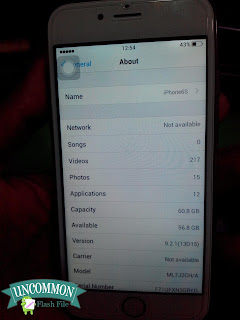
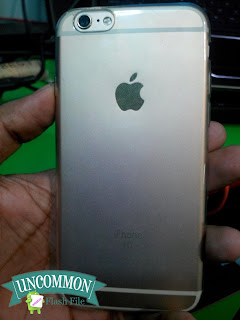
Reading Flash Content now ...
[Read Ok] : preloader_zr71_e_lca.bin
[Read Ok] : lk.bin
[Read Ok] : boot.img
[Read Ok] : recovery.img
[Read Ok] : secro.img
[Read Ok] : logo.bin
[Read Ok] : system.img
[Read Ok] : cache.img
[Read Ok] : usrdata.img
[ScatCFG] : MT6571 / V1.1.1 / zr71_e_lca / NAND
FW Size : 320 MiB
Brand : Apple
ProdName : Apple iPhone
ProdModel : 6s
Device : Apple
AndroidVer: 4.2.2
MTKxCPU : MT6589
MTKxPRJ : ALPS.JB7.MP.V1.14
Android Info saved

Yahoo id : uzzal_computer@yahoo.com
Skype : uzzal.computer
Facebook id : uzzal.computer
How to Flash
Step 1: Download and extract the firmware on your computer.
Step 2: After extracting you will find the SP Flash Tool, Driver and instruction manual.
Step 3: Install the USB Drivers (skip if drivers are already installed).
Step 4: Open the SP Flash Tool and load the Scatter File from the firmware folder.Step
5: Connect your Smartphone to the computer using the USB Driver.Step 6: Click on Upgrade / Download Button in the SP Flash Tool to Begin the Flashing.Step 7: Green Ring will appear at the end of successful Flash.
Available link for download
Thursday, March 16, 2017
Kumpulan Cusrom Lenovo A316i Fast Smoot Tested By Localtechno and Work 100
Kumpulan Cusrom Lenovo A316i Fast Smoot Tested By Localtechno and Work 100
Salam Localtechno kali ini localtechno akan berbagi dengan sobat semua tentang "Costume ROM collection for lenovo A316I tested by Localtechno" nah gunanya cusrom collection ini untuk memudahkan sobat semua dalam memilih dan mencoba ROM android modifikasi atau ROM ori yang diport dan dijadikan ROM atau OS untuk Lenovo A316i.
Langsung aja yuk kita pilih ROM nya dibawah ini :
1. ROM Lollifox Android 5.0 for Lenovo A316i Download ROM nya di SINI


Available link for download
Sunday, February 26, 2017
KARBONN K9 AUTO ON DONE 100 TESTED SOLUTION KARBONN K9 AUTO ON SOLUTION
KARBONN K9 AUTO ON DONE 100 TESTED SOLUTION KARBONN K9 AUTO ON SOLUTION
KARBONN K9 AUTO ON SOLUTION

Available link for download
Thursday, February 23, 2017
Lenovo IdeaPad 100 14IBY Driver
Lenovo IdeaPad 100 14IBY Driver

Specifications
Lenovo IdeaPad 100-14IBY
Model : Lenovo IdeaPad
Processor: Intel Celeron N2940 1.83 GHz
Graphics : Intel HD Graphics
Display: 14.0 inch 16:9, 1366x768 pixel,
Storage : HDD 500GB
Memory : 4GB
Lenovo IdeaPad 100-14IBY Driver Download
Lenovo IdeaPad 100-14IBY is recommended using Windows registered 64Bit
Driver Windows 7 64 bit
Intel Chipset driver 34MB Download
Audio Driver 112 MB Download
Bluetooth Driver. 53MB Download
LAN Driver 4MB Download
Touchpad Driver. 38MB Download
VGA Intel Driver. 65MB Download
RealtekWireless Driver. 29MB Download
Camera Software. 5MB Download
Card Reader. 5MB Download
Driver Windows 8.1 64bit
Intel Chipset driver 34MB Download
Audio Driver 112 MB Download
Bluetooth Driver. 52MB Download
LAN Driver 4MB Download
Touchpad Driver. 38MB Download
VGA Intel Driver. 65MB Download
Realtek Wireless Driver. 32MB Download
Camera Software. 5MB Download
Card Reader. 5MB Download
Driver Windows 10 64bit
Intel Chipset driver 34MB Download
Audio Driver 165 MB Download
Realtek Bluetooth Driver. 52MB Download
LAN Driver 6MB Download
Touchpad Driver. 42MB Download
VGA Intel Driver. 65MB Download
Realtek Wireless Driver. 15MB Download
Camera Software. 10MB Download
Card Reader. 5MB Download
Please Leave comment if you have any question related this topic. I will reply soon..
Available link for download
Sunday, February 19, 2017
iPhone 6 Clone MT6571 NAND alps MT6571 benrui71 e lca 4 2 2 ALPS JB7 MP V1 14 firmware 100 tested
iPhone 6 Clone MT6571 NAND alps MT6571 benrui71 e lca 4 2 2 ALPS JB7 MP V1 14 firmware 100 tested
A1586
MT6571_NAND_alps__MT6571__benrui71_e_lca__4.2.2__ALPS.JB7.MP.V1.14


Reading Flash Content now ...
[Read Ok] : preloader_benrui71_e_lca.bin
[Read Ok] : lk.bin
[Read Ok] : boot.img
[Read Ok] : recovery.img
[Read Ok] : secro.img
[Read Ok] : logo.bin
[Read Ok] : system.img
[Read Ok] : cache.img
[Read Ok] : usrdata.img
[ScatCFG] : MT6571 / V1.1.1 / benrui71_e_lca / NAND
FW Size : 300 MiB
Brand : alps
ProdName : benrui71_e_lca
ProdModel : MT6571
Device : benrui71_e_lca
AndroidVer: 4.2.2
MTKxCPU : MT6571
MTKxPRJ : ALPS.JB7.MP.V1.14
Android Info saved
Scatter saved to : C:UsersShuhanDesktopFrimwerMT6571_NAND_alps__MT6571__benrui71_e_lca__4.2.2__ALPS.JB7.MP.V1.14
Done!
Ph: +8801712804630
Yahoo id : uzzal_computer@yahoo.com
Skype : uzzal.computer
Facebook id : uzzal.computer
How to Flash
Step 1: Download and extract the firmware on your computer.
Step 2: After extracting you will find the SP Flash Tool, Driver and instruction manual.
Step 3: Install the USB Drivers (skip if drivers are already installed).
Step 4: Open the SP Flash Tool and load the Scatter File from the firmware folder.Step
5: Connect your Smartphone to the computer using the USB Driver.Step 6: Click on Upgrade / Download Button in the SP Flash Tool to Begin the Flashing.Step 7: Green Ring will appear at the end of successful Flash.
Available link for download
Friday, February 10, 2017
Jalur keypad nokia c3 dengan jelas dan detail 100 sukses
Jalur keypad nokia c3 dengan jelas dan detail 100 sukses
Cara jumper keypad nokia C3
Untuk kasus handphone ini, jika keypad tidak berfungsi sering terjadi karena jalur putus. jadi bukan pada IC EMIF atau IC control keypad.
Silahkan lihat gambar dibawah ini:

Dari gambar diatas, kita bisa mencari jalur keypad yang putus, dan untuk urutan jalur keypadnya bisa lihat dibawah ini:
- arah atas, q, a, z, sys, i, k, (,)
- arah bawah, w, s ,x, o, l, .
- arah kiri, e, d, c p, backspace, enter
- arah kanan, kembali, r, f, v, shift
- tombol tengah, t, g, b, @
- menu, y, h, n, ?
- call, u, j, m
Available link for download
Tuesday, January 31, 2017
M706 MB V2 1 Zentality C727 MT6572 100 tested
M706 MB V2 1 Zentality C727 MT6572 100 tested
MT6572_alps_C-727_C-727.JB3.MP.V1.12_20160330_124548

Available link for download
Thursday, January 26, 2017
Master Copy China Nokia 220 All Flash file 100 Tetsde Here
Master Copy China Nokia 220 All Flash file 100 Tetsde Here


Flash Name:SF_GD25LQ32
Flash Size:0x00400000 -> 4M
CPU Name:6531
Baud Rate is Switched To:921600
>>> Reading Flash...
Reality Flash Size£º0x00400000 -> 4M
All Done
Download Link
| 2G Network | GSM 900 / 1800 - SIM 1 & SIM 2 (dual SIM model only) GSM 900 / 1800 |
| Alert types | Vibration; MP3 ringtones |
| Battery Performance | Stand-by: up to 576 h Talk time: up to 15 h |
| Battery Type | Li-Ion 1100 mAh battery (BL-5C) |
| Bluetooth | v3.0 |
| Camera | 2 MP, 1600 x 1200 pixels, 1/5 sensor size |
| Colors Available | Red, black, white, yellow, cyan |
| Dimensions | 116.4 x 50.3 x 13.2 mm (4.58 x 1.98 x 0.52 inches) |
| Display Resolution | 240 x 320 pixels (~167 ppi pixel density) |
| Display Size | 2.4 inches |
| Display Type | TFT, 256K colors |
| EDGE | No |
| Front Camera | No |
| Games | Yes |
| GPRS | Up to 85.6 kbps |
| GPS | No |
| Internal Memory | 256 MB |
| Java | - |
| Loudspeaker | Yes |
| Memory Card Slot | MicroSD, up to 32 GB |
| Messaging | SMS (threaded view), MMS, Email, IM |
| Other Features | - SNS applications - MP4/H.264/H.263 player - MP3/WAV/AAC player - Organizer - Voice memo - Predictive text input |
| Phonebook | Maximum 500 entries |
| Radio | Stereo FM radio with RDS |
| RAM | 64 MB |
| Release Date | February 2014 |
| SIM Card Type | Optional Dual SIM (Mini-SIM) |
| USB | MicroUSB v1.1 |
| Video | QVGA@15fps |
| Web Browser | WAP 2.0/xHTML |
| Weight | 83.6 |
| Wireless LAN | No |
Nokia 220 Rating by MobileDokan
Design - 85%
Features - 75%
Performance - 80%
Price - 80%
Available link for download
Sunday, November 20, 2016
kzen Velocity Official Firmware 100 tested
kzen Velocity Official Firmware 100 tested
KZEN Velocity Firmware

Reading Flash Content now ...
Brand : Velocity
ProdName : Velocity
ProdModel : Velocity
Device : Velocity
AndroidVer: 4.4.2
MTKxCPU : MT6572
MTKxPRJ : ALPS.KK1.MP7.V1
[Read Ok] : preloader_hongyu72_cwet_71_kk.bin
[Read Ok] : MBR
[Read Ok] : EBR1
[Read Ok] : lk.bin
[Read Ok] : boot.img
[Read Ok] : recovery.img
[Read Ok] : secro.img
[Read Ok] : logo.bin
[Read Ok] : system.img
[Read Ok] : cache.img
[Read Ok] : userdata.img
[ScatCFG] : MT6572 / V1.1.1 / hongyu72_cwet_71_kk / EMMC
Android Info saved
MAUI Meta DB saved
HWConfig Info saved
FW Size : 755 MiB
Scatter saved to : C:UsersShuhanDesktopFrimwerMT6572__Velocity__Velocity__Velocity__4.4.2__ALPS.KK1.MP7.V1
All done!
Done!
Available link for download
Sunday, November 6, 2016
Kamus bahasa indonesia jawa sumpah bikin ngakak 100
Kamus bahasa indonesia jawa sumpah bikin ngakak 100

Coba lihat dan baca dibawah ini :
- 1. Menyentuh = The Meek
- 2. Melihat = The Look
- 3. Bersimpuh = The Prok
- 4. Sembunyi = The lick
- 5. Tenggelam = The Leep
- 6. Jauh dari kota = The so
- 7. Batang pisang = The Bock
- 8. Terjungkal = The Loshoor
- 9. Ketakutan = The Regdeg
- 10. Gemetar = The Rogdog
- 11. Ikut = The Rek
- 12. Mojok Sembunyi = The Mpiss
- 13. Kotoran = The Lek
- 14. Dihabiskan = The End Tekno
- 15. Ngga Mandi = The Kiil
- 16. Terkesima = The Long Op
- 17. Setan = The meet
- 18. Kelapa Segar = The Ghan
- 19. Gak Tahu Malu = The Lap
- 20. Hujan Lebat = The Rest
Available link for download
Saturday, October 15, 2016
M706 MB V4 2 Galaxy Tab 7 Firmware 100 Tested
M706 MB V4 2 Galaxy Tab 7 Firmware 100 Tested
M706-MB-V4.2
Galaxy tab 7==m706-mb-v4.0 Flash file 100% ok
MT6572__alps__M706__m72_emmc_s6_pcb22_ddr1__4.2.2__ALPS.JB3.MP.V1.12

for password--uzzal_computer@yahoo.com
01712-804630
Available link for download
Monday, October 10, 2016
KECHAODA C8 Official Firmware 100 tested by me
KECHAODA C8 Official Firmware 100 tested by me
MT6572_NAND_kechaoda__MT6572__leatek72_et_lca__4.2.2__ALPS.JB3.MP.V1


Ph: +8801712804630
Yahoo id : uzzal_computer@yahoo.com
Skype : uzzal.computer
Facebook id : uzzal.computer
How to Flash
Step 1: Download and extract the firmware on your computer.
Step 2: After extracting you will find the SP Flash Tool, Driver and instruction manual.
Step 3: Install the USB Drivers (skip if drivers are already installed).
Step 4: Open the SP Flash Tool and load the Scatter File from the firmware folder.Step
5: Connect your Smartphone to the computer using the USB Driver.Step 6: Click on Upgrade / Download Button in the SP Flash Tool to Begin the Flashing.Step 7: Green Ring will appear at the end of successful Flash.
Available link for download