Showing posts with label clone. Show all posts
Showing posts with label clone. Show all posts
Thursday, April 20, 2017
Iphone 6 Plus Clone Firmware Flash File Free Download
Iphone 6 Plus Clone Firmware Flash File Free Download
Iphone 6 Plus Clone Official Firmware Flash Tools Free Download
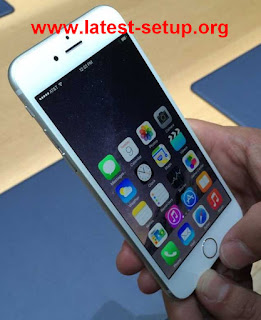
Get Free Iphone 6 Plus Clone Firmware Official (Original) Flash File 100% working free of cost. So Direct download links for the latest version of firmware file for Iphone 6 Plus Copy/Clone.Stock ROMs Version is:MT6572__iPhone__6_Plus__e165_jb3__4.2.2__ALPS.JB3.MP.V1
Iphone 6 Plus Clone Flash File Without password
This File Is Free No Need Any Cost Just Contact With me. Click Here
Firmware Download
Flash tools Download
MTK USB Driver Download
How To Flash or Install ROM:
- Unpack FlashTools, and Click on Flash_tool.exe
- Select "scatter-Loading" and search MT6572_Android_scatter.txt in ROM
- Wait file to be added into Flash Tool
- Select "Download Only" or if upgrade "Firmware upgrade"
- Turn off your phone, remove the battery (if the battery is removable) and replace it after some seconds (and dont turn on the phone).
- Press “Download” button to start
- and connect your phone into the computer via USB data cable.
- The process will start and a red progress bar will appear after color purple, yellow.
- And green circles display
- Finish !
- You can now safely disconnect your phone and turn it on.
Important Notes:[*]Take a Backup of your personal data before flashing or installing the firmware on your smartphone. As this helps you to recover the personal data whenever any thing wrong happens.
Available link for download

Tuesday, April 11, 2017
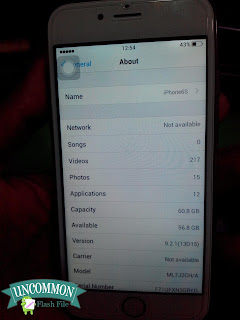
iPhone 6s Clone MT6571 NAND Apple 6s Apple 4 2 2 ALPS JB7 MP V1 14 100 tested by me
iPhone 6s Clone MT6571 NAND Apple 6s Apple 4 2 2 ALPS JB7 MP V1 14 100 tested by me
MT6571_NAND_Apple__6s__Apple__4.2.2__ALPS.JB7.MP.V1.14
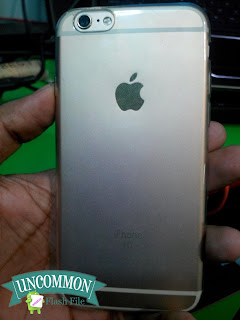
iPhone 6s Clone
Reading Flash Content now ...
[Read Ok] : preloader_zr71_e_lca.bin
[Read Ok] : lk.bin
[Read Ok] : boot.img
[Read Ok] : recovery.img
[Read Ok] : secro.img
[Read Ok] : logo.bin
[Read Ok] : system.img
[Read Ok] : cache.img
[Read Ok] : usrdata.img
[ScatCFG] : MT6571 / V1.1.1 / zr71_e_lca / NAND
FW Size : 320 MiB
Brand : Apple
ProdName : Apple iPhone
ProdModel : 6s
Device : Apple
AndroidVer: 4.2.2
MTKxCPU : MT6589
MTKxPRJ : ALPS.JB7.MP.V1.14
Android Info saved
 Ph: +8801712804630
Yahoo id : uzzal_computer@yahoo.com
Skype : uzzal.computer
Facebook id : uzzal.computer
How to Flash
Step 1: Download and extract the firmware on your computer.
Step 2: After extracting you will find the SP Flash Tool, Driver and instruction manual.
Step 3: Install the USB Drivers (skip if drivers are already installed).
Step 4: Open the SP Flash Tool and load the Scatter File from the firmware folder.Step
5: Connect your Smartphone to the computer using the USB Driver.Step 6: Click on Upgrade / Download Button in the SP Flash Tool to Begin the Flashing.Step 7: Green Ring will appear at the end of successful Flash.
iPhone 6s Clone
Reading Flash Content now ...
[Read Ok] : preloader_zr71_e_lca.bin
[Read Ok] : lk.bin
[Read Ok] : boot.img
[Read Ok] : recovery.img
[Read Ok] : secro.img
[Read Ok] : logo.bin
[Read Ok] : system.img
[Read Ok] : cache.img
[Read Ok] : usrdata.img
[ScatCFG] : MT6571 / V1.1.1 / zr71_e_lca / NAND
FW Size : 320 MiB
Brand : Apple
ProdName : Apple iPhone
ProdModel : 6s
Device : Apple
AndroidVer: 4.2.2
MTKxCPU : MT6589
MTKxPRJ : ALPS.JB7.MP.V1.14
Android Info saved
Yahoo id : uzzal_computer@yahoo.com
Skype : uzzal.computer
Facebook id : uzzal.computer
How to Flash
Step 1: Download and extract the firmware on your computer.
Step 2: After extracting you will find the SP Flash Tool, Driver and instruction manual.
Step 3: Install the USB Drivers (skip if drivers are already installed).
Step 4: Open the SP Flash Tool and load the Scatter File from the firmware folder.Step
5: Connect your Smartphone to the computer using the USB Driver.Step 6: Click on Upgrade / Download Button in the SP Flash Tool to Begin the Flashing.Step 7: Green Ring will appear at the end of successful Flash.
Available link for download
Sunday, February 19, 2017
iPhone 6 Clone MT6571 NAND alps MT6571 benrui71 e lca 4 2 2 ALPS JB7 MP V1 14 firmware 100 tested
iPhone 6 Clone MT6571 NAND alps MT6571 benrui71 e lca 4 2 2 ALPS JB7 MP V1 14 firmware 100 tested
iPhone 6 Clone
A1586
MT6571_NAND_alps__MT6571__benrui71_e_lca__4.2.2__ALPS.JB7.MP.V1.14


Reading Flash Content now ...
[Read Ok] : preloader_benrui71_e_lca.bin
[Read Ok] : lk.bin
[Read Ok] : boot.img
[Read Ok] : recovery.img
[Read Ok] : secro.img
[Read Ok] : logo.bin
[Read Ok] : system.img
[Read Ok] : cache.img
[Read Ok] : usrdata.img
[ScatCFG] : MT6571 / V1.1.1 / benrui71_e_lca / NAND
FW Size : 300 MiB
Brand : alps
ProdName : benrui71_e_lca
ProdModel : MT6571
Device : benrui71_e_lca
AndroidVer: 4.2.2
MTKxCPU : MT6571
MTKxPRJ : ALPS.JB7.MP.V1.14
Android Info saved
Scatter saved to : C:UsersShuhanDesktopFrimwerMT6571_NAND_alps__MT6571__benrui71_e_lca__4.2.2__ALPS.JB7.MP.V1.14
Done!
-----------------------------------------------------------------------------------
Ph: +8801712804630
Yahoo id : uzzal_computer@yahoo.com
Skype : uzzal.computer
Facebook id : uzzal.computer
How to Flash
Step 1: Download and extract the firmware on your computer.
Step 2: After extracting you will find the SP Flash Tool, Driver and instruction manual.
Step 3: Install the USB Drivers (skip if drivers are already installed).
Step 4: Open the SP Flash Tool and load the Scatter File from the firmware folder.Step
5: Connect your Smartphone to the computer using the USB Driver.Step 6: Click on Upgrade / Download Button in the SP Flash Tool to Begin the Flashing.Step 7: Green Ring will appear at the end of successful Flash.
A1586
MT6571_NAND_alps__MT6571__benrui71_e_lca__4.2.2__ALPS.JB7.MP.V1.14
Reading Flash Content now ...
[Read Ok] : preloader_benrui71_e_lca.bin
[Read Ok] : lk.bin
[Read Ok] : boot.img
[Read Ok] : recovery.img
[Read Ok] : secro.img
[Read Ok] : logo.bin
[Read Ok] : system.img
[Read Ok] : cache.img
[Read Ok] : usrdata.img
[ScatCFG] : MT6571 / V1.1.1 / benrui71_e_lca / NAND
FW Size : 300 MiB
Brand : alps
ProdName : benrui71_e_lca
ProdModel : MT6571
Device : benrui71_e_lca
AndroidVer: 4.2.2
MTKxCPU : MT6571
MTKxPRJ : ALPS.JB7.MP.V1.14
Android Info saved
Scatter saved to : C:UsersShuhanDesktopFrimwerMT6571_NAND_alps__MT6571__benrui71_e_lca__4.2.2__ALPS.JB7.MP.V1.14
Done!
Ph: +8801712804630
Yahoo id : uzzal_computer@yahoo.com
Skype : uzzal.computer
Facebook id : uzzal.computer
How to Flash
Step 1: Download and extract the firmware on your computer.
Step 2: After extracting you will find the SP Flash Tool, Driver and instruction manual.
Step 3: Install the USB Drivers (skip if drivers are already installed).
Step 4: Open the SP Flash Tool and load the Scatter File from the firmware folder.Step
5: Connect your Smartphone to the computer using the USB Driver.Step 6: Click on Upgrade / Download Button in the SP Flash Tool to Begin the Flashing.Step 7: Green Ring will appear at the end of successful Flash.
Available link for download
Friday, January 27, 2017
iOS7 Control Center Clone for Android
iOS7 Control Center Clone for Android

One of the many features and “innovations” Apple fans worldwide love to tout is the all-too-familiar
notification and settings area from Android Control Center of settings toggles and shortcuts. Putting aside the usual knee-jerk copycat accusations, kudos to the company for at least drawing inspiration from their main competitor. Because let’s admit it, the Control Center does look interesting, in either design philosophy or whatever fruity flavor Apple has thrown in the mix.
So if you’ve ever wanted to give this a go on your Android device, you can get pretty close to the real deal with XDA Forum Member mallikvala‘s iOS7-inspired Control Center. Control Center replicates the experience one would have when using the actual feature on an iPhone. By tapping on the bottom edge of the screen, the sidebar-like Control Center slides up revealing settings toggles, brightness and volume sliders, a music widget, and seven shortcuts to apps.
Mallikvala has also packed in an extra couple of neat features that the original may or may not have. Most notably, there is a high degree of customization in regards to the aesthetics and themes, allowing you to mix and match the two colors of the panel’s background gradient. In addition to the colors, the gradient style can also be chosen, such as top-to-bottom, corner-to-corner, or left-to-right. You can also toggle Mini view, which minimizes the control center to display only settings toggles.
Control Center is ad-free and is compatible with Gingerbread and later. If you’d like to check it out, visit the application thread for more information
Available link for download
Subscribe to:
Posts (Atom)