Showing posts with label lock. Show all posts
Showing posts with label lock. Show all posts
Thursday, April 27, 2017
LAVA IRIS X8 Hard Reset Pattern Lock reset done 100 Tested
LAVA IRIS X8 Hard Reset Pattern Lock reset done 100 Tested
LAVA IRIS X8 MT6592 PATTERN LOCK READ DONE
MORE PROFIT FOR U IF U HAVE INFERNO IN UR LAB
READ EXTEND INFO
MORE PROFIT FOR U IF U HAVE INFERNO IN UR LAB
READ EXTEND INFO

READ PATTERN LOCK SEE

Available link for download

Wednesday, March 29, 2017
Lock and Erase Data from lost android SmartPhone Using android Device Manager
Lock and Erase Data from lost android SmartPhone Using android Device Manager
Yes, you read the post title correctly, you can lock and erase data from your lost Android Smartphone using android device manager. In this post I will guide you through the complete process to secure your Android Smartphone.
What is Android Device Manager?
If you have missed or lost your android device, you can locate your device using android device manager. Or if you have lost your Android, you can lock and erase data from it using this technology easily.Steps to secure your Android Device.
You secure your android Device you need to complete some steps. Here I have make it easier for you to understand.
1. Go to main menu of android Device
2. Tap on settings
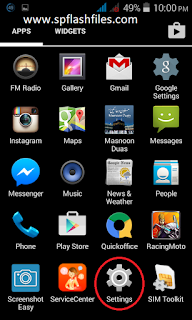
3. And Turn on Location. Android Device manager uses device current location to locate it.
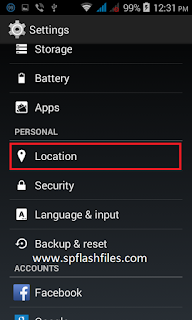
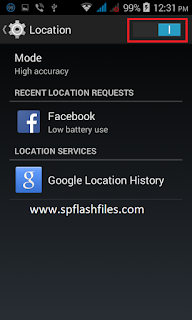
Lock and Erase Data from Lost Android Device.
If you lost your android Device then Visit android device manager on desktop browser. To use Android Device manager you need the Google account which you used on your android Device.1. Login to Android Device manager. (Click here to Login)
2. Enter your Google email and password to proceed.
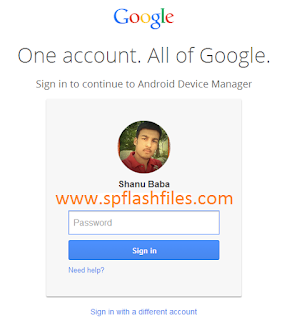
3. Here you can can ring you device if you have missed it somewhere, lock and erase your device if you have lost it.
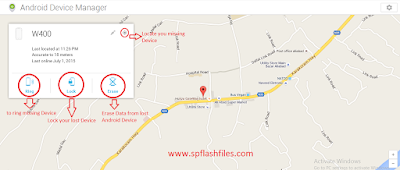
You can use highlighted option in image to locate, lock devices and you can also erase data for lost device....
thanks for visiting.
Tags: android device manager location unavailable, locate android device, locate android phone, locate android phone,
google play android device manager, locate my phone, locate my android phone, where is my cell phone,
android device manager, ndroid device manager login, android device manage, device manager android
Available link for download
Saturday, February 18, 2017
Lenovo A396 Google Account Lock Remove Solution
Lenovo A396 Google Account Lock Remove Solution

Lenovo A396 Spd Sc7730 Google Account Lock Hard Reset File Latest Flash File Download Directly For Free Without Password & Direct Download This is The Latest Version Firmware Available Latest-Setup.org It is Tested As Well As Good And Working .
Lenovo A396 Spd Sc7730 Pattern Lock Done
Download File
ResearchDownload_9005
Lenovo A396 Spd Sc7730 Pattern Lock Done
Download File
ResearchDownload_9005
Available link for download
Thursday, February 2, 2017
Intex Aqua Y2 Pro MT6572 hard reset pattern lock reset done
Intex Aqua Y2 Pro MT6572 hard reset pattern lock reset done
Intex Aqua Y2Pro MT6572 Wipe Done Just One Click By Volcano Inferno Key


Available link for download
Tuesday, December 27, 2016
Lava Iris X1 Pattern Lock Remove Done By Miracle Box
Lava Iris X1 Pattern Lock Remove Done By Miracle Box
lava iris x1 atom sc7730g read pattern in second
without root
without adb
without lost any data
How hard reset Lava Iris X1 with miracle box
only in secnd just read info n give patternlock
How to unlock Lava Iris X1 Privacy Lock solution Here!
great miracle
read pattern

read info after adb on

Available link for download
Friday, November 18, 2016
Karbonn a6 Screen Lock Hard Reset Solution
Karbonn a6 Screen Lock Hard Reset Solution
(Step 1) Use miracle box
How to remove Karbonn a6+ Screen Lock with miracle box

(Step 2) Hard reset method
1: Press Power button, until your phone is off.
2: Next hold and press Volume Up + Volume Down + Power button until you see menu with 2 options.
3: From this menu choose option Recovery Mode.
Press Volume Up to enter this mode.
4: If you see Android logo on your screen, then press Power button.
5: Navigate to option "wipe data/factory reset" using Volume buttons to scroll, and Menu key + Back key to confirm.
6:Then accept this: "Yes -- delete all user data" with holding for few seconds Menu key + Back key.
7: After that confirm option "reboot".
8: Thats all.
WARNING !
Hard Reset will erase all of your data
All described operations you are doing at your own risk.
Available link for download
Subscribe to:
Posts (Atom)